
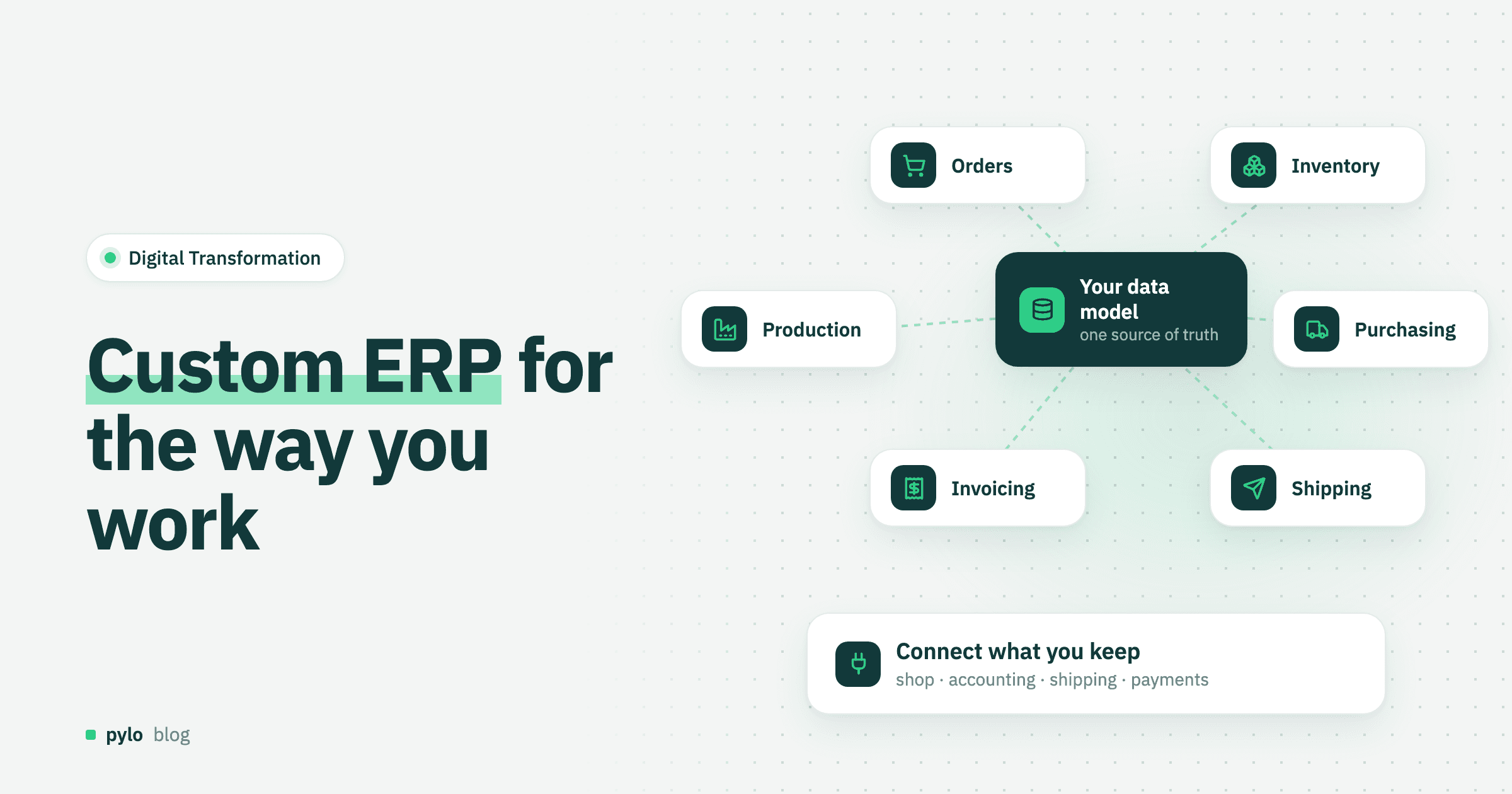
Standard ERP systems promise to run your whole company in one place. For many small and mid-sized businesses, the reality is a long rollout, a process bent to fit the software, and Excel files around it for everything the ERP cannot do. A custom ERP flips that around: the system follows your process.
This guide explains when a custom ERP system makes sense, how to decide process by process, what the architecture looks like, and how to build a custom order management system as a first step.
What is a custom ERP?
ERP stands for enterprise resource planning: the software that connects orders, inventory, purchasing, production, invoicing and accounting. A standard ERP ships with fixed modules and workflows that you configure. A custom ERP is built around your own data model and processes. You decide which modules exist, how they connect and what happens automatically.
Custom does not mean writing everything from zero. Most custom ERP systems today are a custom core for the processes that set a company apart, connected to standard tools for everything else, such as accounting, payroll or the online shop.
Custom ERP vs standard ERP
Feature | Standard ERP | Custom ERP |
Fit with your process | You adapt to the software | The software adapts to you |
Time to first use | Fast for standard modules, long for full rollout | Weeks for a first module, then step by step |
Cost structure | Licenses per user plus implementation partner | Development plus platform or hosting |
Changes later | Through configuration, or expensive customization | Your team or partner changes it directly |
Compliance features | Included, for example tax rules and bookkeeping | Connect a standard tool for these or bring your own |
Vendor dependence | High | Depends on how you build it |
When does a custom ERP system make sense?
The useful question is not "custom or standard" for the whole company. Ask it for each process, these two questions are enough: how standard is the process, and how much does it set you apart from competitors?
Standard and not a differentiator, such as accounting, payroll and tax: buy standard software. Nobody chooses you because of your bookkeeping.
Standard but a differentiator, such as fast delivery promises: buy the core and build the one module that differs, connected through an API.
Unusual and a differentiator, such as product configurators, special production steps or your own pricing logic: build it custom. This is where standard ERPs need the most expensive customization.
Unusual but not a differentiator: often a habit rather than a requirement. Simplify the process before writing software for it.
Most companies end up with a mix. That is the normal outcome, and it is the same hybrid logic as in our build vs buy software guide.
A custom ERP is usually the better choice when:
You make or sell configurable, made-to-order or project-based products.
Your current ERP is surrounded by spreadsheets that hold the real process.
You have tried a standard ERP and the customization quote was larger than the license.
You need to connect machines, partner portals or AI agents that a standard ERP does not support well.
The architecture of a custom ERP
A practical custom ERP has three layers.
A shared data model. Customers, products, orders, stock, production orders and invoices live in one place with real relations. This is the part that replaces the spreadsheets, and it is the most important design work. If you are still on Excel, start with our guide to moving from Excel to a database.
Workflows. Rules that run when data changes, on a schedule or when another system sends an event. "When an order is confirmed, reserve stock." "Every night, create purchase orders for items below minimum." External systems usually trigger these through webhooks, explained in what is a webhook.
Integrations and interfaces. Your shop, accounting software, shipping carrier and payment provider connect through APIs. On top sit the screens each team needs: a production board, a warehouse scanner view, a sales order form, a customer portal. Sales often needs its own front end too, which is why many teams pair the ERP with a custom CRM on the same data model.
Start with a custom order management system
Do not build the whole ERP at once. Start with the process that hurts most and touches the most data. For most product companies that is order management, because orders connect customers, stock, shipping and invoicing.
A first custom order management system covers order to cash:
Order in. Orders arrive from the shop, by email, through EDI or from sales reps. All land in one Order table, through a webhook or an input form.
Check stock. The system checks availability per product and location.
Reserve, or produce. If stock is there, it is reserved for this order. If not, the workflow creates a production or purchase order and tells sales the new date.
Ship. A carrier API creates the label and stores the tracking number on the order.
Invoice. When the order is marked shipped, an invoice is generated from a document template and sent.
Paid. The payment provider reports the payment, and the order is closed.
Every step that used to be a copy-paste between tools becomes a rule. Once orders run cleanly, add the next module: purchasing, production planning or a customer portal.
How to build it: three ways
There are three common ways to approach custom ERP software development:
Agency or software house. A partner builds the system to your spec. Good if you have no developers. Watch out for who owns the code and how expensive changes will be after go-live.
In-house from scratch. Your own developers build database, API, auth, roles, workflows and UI. Maximum control, but much of the effort goes into infrastructure every business app needs.
On a backend platform. The platform provides database, API, permissions, workflow engine, imports and document generation. Your team or partner spends its time on the data model and the processes. This usually gets a first module live in weeks rather than months, is better suited for agentic coding and follows the rule of not spending time on features that are no differentiator. Read more about the model in platform as a service explained or use our own backend as a service platform pylo.
Risks and how to avoid them
Rebuilding standard processes, e.g. accounting. Do not, instead connect a standard accounting tool that handles tax rules and bookkeeping requirements, and send it invoices and payments.
Big-bang rollout. Replacing everything on one date is how ERP projects fail. Go module by module, with the old process as a fallback for a few weeks, make sure the people who work with the ERP every day get involved early on.
No process owner. Each module needs one person in the business who decides how it works. Developers should not guess and developers should not be the ones who decide.
Key-person risk. If one freelancer understands the system, you have recreated the spreadsheet problem. Document the data model and keep workflows visible, not hidden in code, generalize it so changes do not depend on one person alone.
Customizing for one-off cases. If a rule applies to two orders a year, handle them manually, until it does get more urgent.
Where AI fits in a custom ERP
Because a custom ERP has a clean data model and an API, AI agents can work with it directly. Typical uses: reading incoming order emails and creating draft orders, answering "where is my order" questions from customers, or flagging orders that will miss their date. The safe pattern is to let agents read data and propose changes that a person approves. For the background, see what is an MCP server and how to build an AI agent.
Conclusion
A custom ERP is the right choice when your core processes are what make you different and a standard system would force you to give that up. Decide per process, buy standard software for accounting and other commodity functions, and build the core around your own data model. Start with order management, get it running cleanly, then add the next module. That keeps risk low and shows value within weeks. For the change management side, read our guide on business process digitization.
pylo is a backend platform for this kind of system: custom entities and relations, a generated GraphQL API with typesafe SDKs, roles and permissions, visual workflows triggered by data changes, schedules or webhooks, CSV and JSON imports, document templates for invoices and delivery notes, and integrations for payments, shipping and accounting. It is made in Germany and has an MCP server for AI agents with human approval for every write.
Keep reading
Digital Transformation
What is SaaS? Software as a service: meaning, pros and examples
SaaS changes how companies use software: instead of installing programs, you use applications directly from the cloud. This post explains what SaaS means and what it offers companies.
Read
Digital Transformation
Business process digitization: how to get it right
Learn which processes are easiest to digitize and how to approach business process digitization step by step.
Read